Overall Workflow
- Audio post production. Workflow: [2.00 - 3.00]
- Prep project
- Import assets from step 1 of PER PODCAST + theme song from step 4 of INITIAL SETUP
- Isolate audio from webinar video/rip audio from webinar video
- Editing and mixing
- Assembly and trimming
- Mastering
- Editing/normalizing audio levels
- First do the essential sound kit and follow this guide for ducking
- Then adjust the master volume - or + dB after looking at the Audio Meters/Mixer
- Reduce background/unwanted noises, etc
- Export file for publishing
- Editing/normalizing audio levels
- Prep project
- Publish/syndicate podcast [1.00]
Audio levels: want to the peak level to be -3dB. Ideally want the audio to be with -6dB - -12dB
Deleting Silence and Long Pauses
| # | Image |
|---|---|
| 1. | 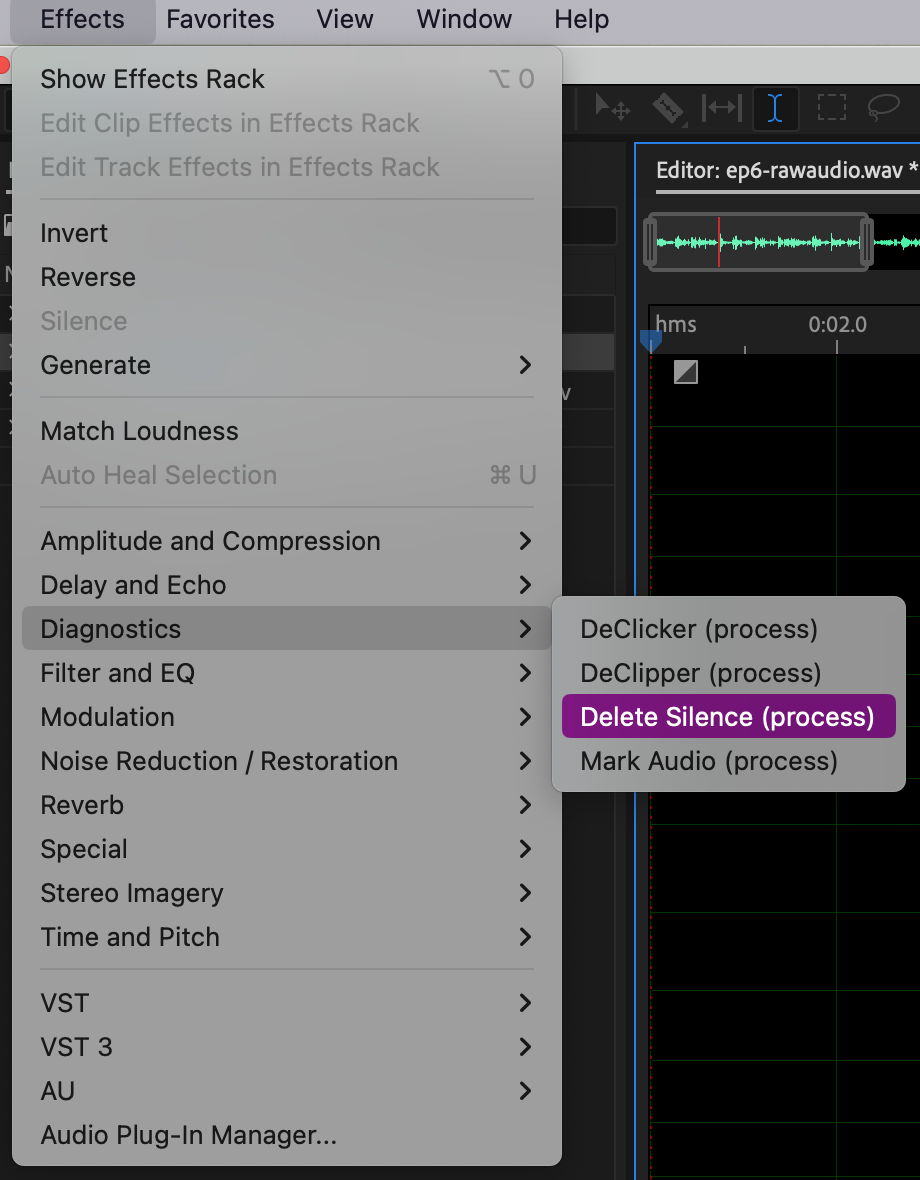 |
| 2. | Select a preset like the podcast one: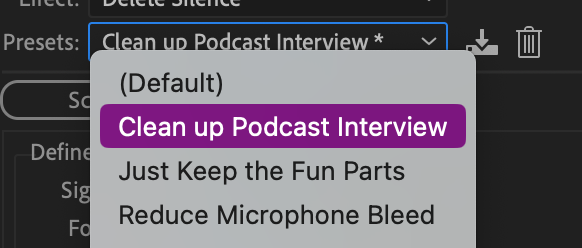 |
| 3. | Click scan: |
| 4. | Fix by Shortening Silence, set 300 - 400 ms. |
| 5. | Select Shorten all |